Showing posts with label Counter. Show all posts

2011-01-02

When to Use an Auto Beat Match Counter When DJing

When it comes to using an auto beat matching counter while you are DJ'ing there really is no right or wrong answer. Beat matching is an art form that comes along with being a DJ.

When you are first starting out as a DJ you may well want to use the auto beat counter on your turntable or the one that comes on your DJ mixer. There is nothing wrong with that especially when you are just starting out.

An auto beat counter is able calculate the beats per minute of a song. For example if you have the Numark TTX1 Direct Drive Turntable then you have access to its auto beat counter.


  1. Simply place the record on the platter

  2. Put the needle on the record

  3. Start the platter and watch the beat counter calculate the beats per minute on the glowing LCD screen.

The TTX1's built in auto beat counter gives you a good advantage to mixing because now you are able to use your auto beat counter to find out the beats per minute of any song you want and mix songs that have the same beats per minute or close to it anyway.

Your goal is to get a sense of rhythm and timing and a beats per minute or (BPM) counter can do that.

When you are using your BPM counter keep in mind that it may not always give you the correct BPM of a record in order to beat match. You will find this out the more you use your DJ equipment.

The more you know your record and the more comfortable you are with your DJ equipment the less you will find yourself relying on you BPM counter.

The primary purpose of the BPM counter is to give you an idea of the record's speed so you can match beats so that you don't have to rely on it every time you want to match beats. Don't allow the BPM counter to become a crutch for you. Let it aide you in developing your sense of rhythm and timing.

Once you learn the art of beat matching you will be able to mix a lot faster and develop a repertoire of mixes that will pleasing to your audience.

Using your auto BPM counter is probably more helpful when you are listening to record with a more obscure beat pattern. They also work well with music that is upbeat and a little more difficult to get a sense of rhythm. In this case using your auto BPM often is suitable in my view.

But like I mentioned earlier try not let it be your crutch. The more you can rely on your senses the better off you are.


Sterling is an article marketer and SEO enthusiast. He has been marketing online since 2003 in many disciplines. Visit his latest website which helps people decide which brands are the best discount kitchen sinks such as the Blanco kitchen sinks.

2010-02-28

Behringer DJX750 Pro Mixer Professional 5-Channel DJ Mixer with Advanced Digital Effects And BPM Counter

Behringer DJX750 Pro Mixer Professional 5-Channel DJ Mixer with Advanced Digital Effects And BPM Counter Review


alright mixer it's good for what i use it for sound quality good for the price overall i'll give it a 4star.


Behringer DJX750 Pro Mixer Professional 5-Channel DJ Mixer with Advanced Digital Effects And BPM Counter Feature


  • Professional 5-channel ultra-low noise DJ mixer with stylish, black design
  • State-of-the-art 24-bit digital effects with advanced parameter control
  • Intelligent dual auto-BPM counter with time and beat sync display
  • Super-smooth ULTRAGLIDE faders with up to 500,000 life cycles
  • Awesome adjustable XPQ stereo surround effect


Behringer DJX750 Pro Mixer Professional 5-Channel DJ Mixer with Advanced Digital Effects And BPM Counter Overview


Professional 5-Channel DJ Mixer with Advanced Digital Effects and BPM Counter


Available at Amazon Check Price Now!


*** Product Information and Prices Stored: Mar 01, 2010 00:12:42

2010-02-23

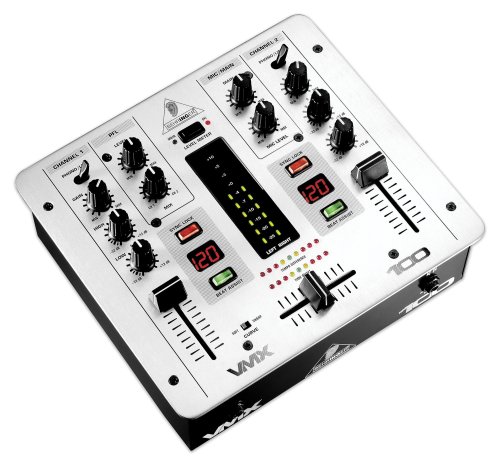
Behringer VMX100 2-Channel DJ Mixer with Beat Counter

Behringer VMX100 2-Channel DJ Mixer with Beat Counter Review


I had a problem. I have an older double cassette tape deck. A good deck with record on the left and a dubber on the right. I wanted to be able play over what I had recorded but I couldn't until I got this little mixer. It allowed me to make the proper in/out connections to make my double cassette a karaoke without the microphone. Of course there is also a mic connection so I can actually sing and play over the top of a pre-recorded tape.

I patted my self on the back for being able to figure this out and I also pat Behringer on the back for making this slick little mixer at a very affordable price.


Behringer VMX100 2-Channel DJ Mixer with Beat Counter Feature


  • 2 dual-input stereo channels
  • 1 ULN microphone input
  • Gain and 2-band kill EQ (-32 dB) per channel
  • Intelligent dual auto BPM counter with time and beat sync display
  • Switchable crossfader curve control


Behringer VMX100 2-Channel DJ Mixer with Beat Counter Overview


The Behringer VMX100 was designed for those of you who need a compact, straight-ahead DJ mixer but don't want to sacrifice either important performance features or audio quality. To that end, the VMX100, Behringer's smallest VMX Mixer, is equipped with their automatic, intelligent BPM counter with Tempo Difference and Time Offset displays plus Sync Lock and Beat Assist functions, as well as Behrigner's new dual-rail ULTRAGLIDE crossfader with a 2-way curve control switch. The VMX100 offers two dual-input stereo channels for connection of up to four stereo sources, selectable on the top panel. A basic ULN mic input with level control is also provided. Each stereo channel sports a great-sounding 2-band kill EQ with 32 dB of attenuation and a 45-mm ULTRAGLIDE fader. The PFL section features a CH-1/CH-2 balance control, while the main section is equipped with a dual 10-segment LED level meter, which displays your choice of main or PFL signals, as well as stereo main mix and tape outputs.


Available at Amazon Check Price Now!


*** Product Information and Prices Stored: Feb 23, 2010 15:11:10